Tribble Engage
The answer, while the buyer is still asking.
Your best answers are already written down somewhere. Tribble Engage briefs your reps before the call, gives them the approved answer during it, and drafts the follow-up after.
- 8:40Before the call
The brief lands in Slack. The security review is still open, and last time the buyer asked about SSO.
- 9:14During the call
Buyer: “Do you support SSO with Okta?”
The approved answer appears in the rep’s thread: yes, SAML SSO and SCIM provisioning with Okta.
Sourcesecurity overview, approved by Security - 9:47After the call
The follow-up email, the next steps and five CRM fields are drafted from the call. They wait for the rep to approve.
Nobody walks in cold.
The brief lands in Slack before the call, built from your CRM, calendar and past calls.
It’s the prep a good rep does with two free hours: what moved on the account, what this buyer has pushed back on, and the questions nobody closed out.
Nobody has two free hours before every call. Engage does it for each one.
- What moved
- A security review opened last week, and procurement joined the thread.
- They care about
- Rollout time, and single sign-on for every team.
- Still open
- Pricing for a second region, promised on the last call.
- Competitors
- One was mentioned on the last call.
- Suggested opener
- Confirm the security review timeline before anything else.
The one question nobody prepped for.
Security, data handling, the integration roadmap, or something your proposal team put in writing months ago.
The rep asks in the Slack or Teams thread they already have open. The approved answer comes back with the document it came from.
When there’s no approved answer, Engage says so. It won’t make one up, and it asks the person who owns the topic.
Example · Slack
Buyer wants to know if we support Okta SSO.
Yes. SAML SSO and SCIM provisioning with Okta are both supported.
Sourcesecurity overview, approved by SecurityAnd do we have a signed DPA template for Brazil?
There’s no approved answer for that yet. I’ve asked Legal and will post it here when they reply.
The follow-up, already written.
Tribble Scribe records the call. Everything it drafts waits for the rep to approve.
| What gets drafted | Drafted from | Who approves it |
|---|---|---|
| To the buyer | ||
| Follow-up email | What was said on the call, with any approved answers attached | The rep, before it sends |
| Into the CRM | ||
| Next steps and action items | The call, with an owner on each one | The rep |
| Opportunity fields | The call and the deal history | The rep |
| Methodology notes | MEDDIC, SPIN, Challenger or your own framework | The rep |
| Risk signals and competitor mentions | What the buyer said | The rep, with the manager able to see them |
| Back into the Brain | ||
| Questions with no approved answer | The call | The owner of that topic, so the next rep gets the answer |
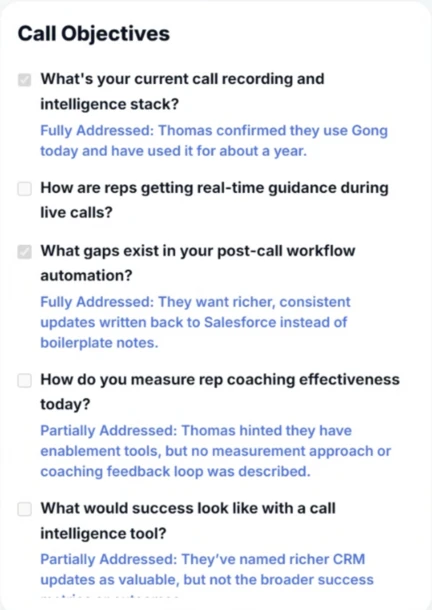
Engage keeps track of the call.
Set the objectives for a call, and Engage marks each one as the buyer covers it, with a short note on what was said.
The rep can see what’s still open before the call ends, not in the recording afterwards.
Sales teams on Tribble.
Customer story · UiPath
How UiPath built one source of truth for its sellers and its entire partner ecosystem
“I tried Tribble last night and have been using it all day, it’s amazing.”JR Kelly, Enablement Leader, UiPath Read the UiPath story →
Sprout Social
65sellers across eight enterprise teams, answers from one shared BrainRead the Sprout Social story →Sprout Social
30-45 minof digging through Gong and Salesforce to work out why a deal died, now automaticRead the Sprout Social story →BrightSign
500+leads gone quiet on one rep’s book, surfaced the first time the Brain lookedRead the BrightSign story →BrightSign
Every Fridayan opportunity report lands with every manager, ordered by close dateRead the BrightSign story →Where Engage fits next to the tools you have.
| Compare | Conversation intelligence | Content library | Tribble Engage |
|---|---|---|---|
| Before the call | Recordings of past calls | Decks and battlecards to search | A brief in Slack: what moved, what’s open, what the buyer cares about |
| During the call | Records it | The rep searches mid-call | The approved answer, with its source, in the rep’s thread |
| No approved answer | Nothing | The rep improvises | Says so, and asks the owner |
| After the call | A summary and transcript | Nothing | Follow-up, next steps and CRM fields, drafted for the rep |
| Answers come from | What was said on calls | What was uploaded | The same approved answers your proposal team uses |
Engage works alongside Gong and other conversation intelligence tools. It doesn’t replace them.
Reads the deal. Writes back to it.
- Salesforce and HubSpotDeal history in, drafted field updates back
- Slack and TeamsWhere reps ask, and where the brief lands
- GongPrior calls for the brief
- CalendarWhich calls are coming up
- Google Drive, SharePoint and OneDriveYour documents
- Confluence and BoxMore of your documents
Your rep approves anything before it’s sent or written back. Tribble doesn’t train on your calls, and it’s SOC 2 Type II compliant, with SSO, SCIM, role-based access and audit logs.
One Brain under both products.
Engage by industry: Healthcare · Financial services · Enterprise tech · Life sciences · Manufacturing · Logistics · Legal services · Consumer goods
Rated by the teams that use it.





Fall 2026, across RFP, AI Sales Assistant, AI Meeting Assistants, AI Proposal Generator Tools and Sales Analytics. Read the reviews on G2 →
FAQ
Common questions.
What is Tribble Engage?
Engage helps your sales team around every buyer conversation. It briefs reps before the call, answers buyer questions during it, and drafts the follow-up and CRM updates after. It runs in Slack, Teams and your CRM.
Is Scribe a separate product?
No. Tribble Scribe is the call recording inside Engage, and it’s included. It captures the call so the follow-up and CRM fields come from what was actually said.
Does it replace Gong or our conversation intelligence tool?
No. Engage connects to Gong and other conversation intelligence tools. They record what happened; Engage helps the rep during the call and drafts what comes after.
What happens when a rep asks something we haven’t approved?
Engage says there’s no approved answer instead of making one up, and sends the question to whoever owns that topic. Once they answer, the next rep gets it.
Does it write to our CRM automatically?
It drafts, and your rep approves. Field updates, next steps, risk notes and methodology notes such as MEDDIC land as a draft on the opportunity. Nothing is sent or written without the rep.
Which systems does it connect to?
Salesforce, HubSpot, Slack, Teams, Gong, Google Drive, SharePoint, Confluence, Box and OneDrive, among others.
How is Engage priced?
Per user, per month. Scribe is included, and so is the Brain. Most teams start with one team and add more users later.
Do we need Tribble Respond first?
No. If you already use Respond, Engage answers from the same approved answers on day one. If you start with Engage, the Brain builds from your documents, calls and deal history.
Bring the question your reps can’t answer.
Pick three questions your reps answer from memory today. We’ll show you what Engage says instead, and where it got it.
Book a working session